> ## Documentation Index
> Fetch the complete documentation index at: https://docs.e-invoice.be/llms.txt
> Use this file to discover all available pages before exploring further.
# Introduction
> Find out how to send and receive Peppol e-invoices with the e-invoice.be API from JSON, UBL XML or PDF.
## What is e-invoice.be?
e-invoice.be is a **recognised [Peppol](/glossary#peppol) [Access Point](/glossary#access-point) and [SMP](/glossary#smp)** that operates under the Belgian Peppol Authority (BOSA). Companies in all countries can use it to send and receive electronic invoices on the Peppol network.
With the API you can:
* Send invoices and [credit notes](/guides/credit-notes) from **JSON**
* Upload **UBL XML** that your ERP system generates
* Create invoices from **PDF files**
* Receive documents from other Peppol participants
* Give Peppol e-invoicing to your own customers through the **reseller programme**
e-invoice.be is a member of the Peppol Security Committee.
 ## Who uses e-invoice.be
* **Individual companies** in many industries (manufacturing, services, retail)
* **Public and private listed companies**
* **SaaS companies**, through the [reseller programme](/reseller-programme)
* **Public and government agencies**
* **Companies with or without an ERP system**
Peppol is an international network for electronic invoicing. E-invoices that you send through Peppol comply with the European standard EN 16931 and are recognised in many countries outside Europe.
## How Peppol works
The Peppol network uses a **4-corner model** for the exchange of e-invoices between companies:
## Who uses e-invoice.be
* **Individual companies** in many industries (manufacturing, services, retail)
* **Public and private listed companies**
* **SaaS companies**, through the [reseller programme](/reseller-programme)
* **Public and government agencies**
* **Companies with or without an ERP system**
Peppol is an international network for electronic invoicing. E-invoices that you send through Peppol comply with the European standard EN 16931 and are recognised in many countries outside Europe.
## How Peppol works
The Peppol network uses a **4-corner model** for the exchange of e-invoices between companies:
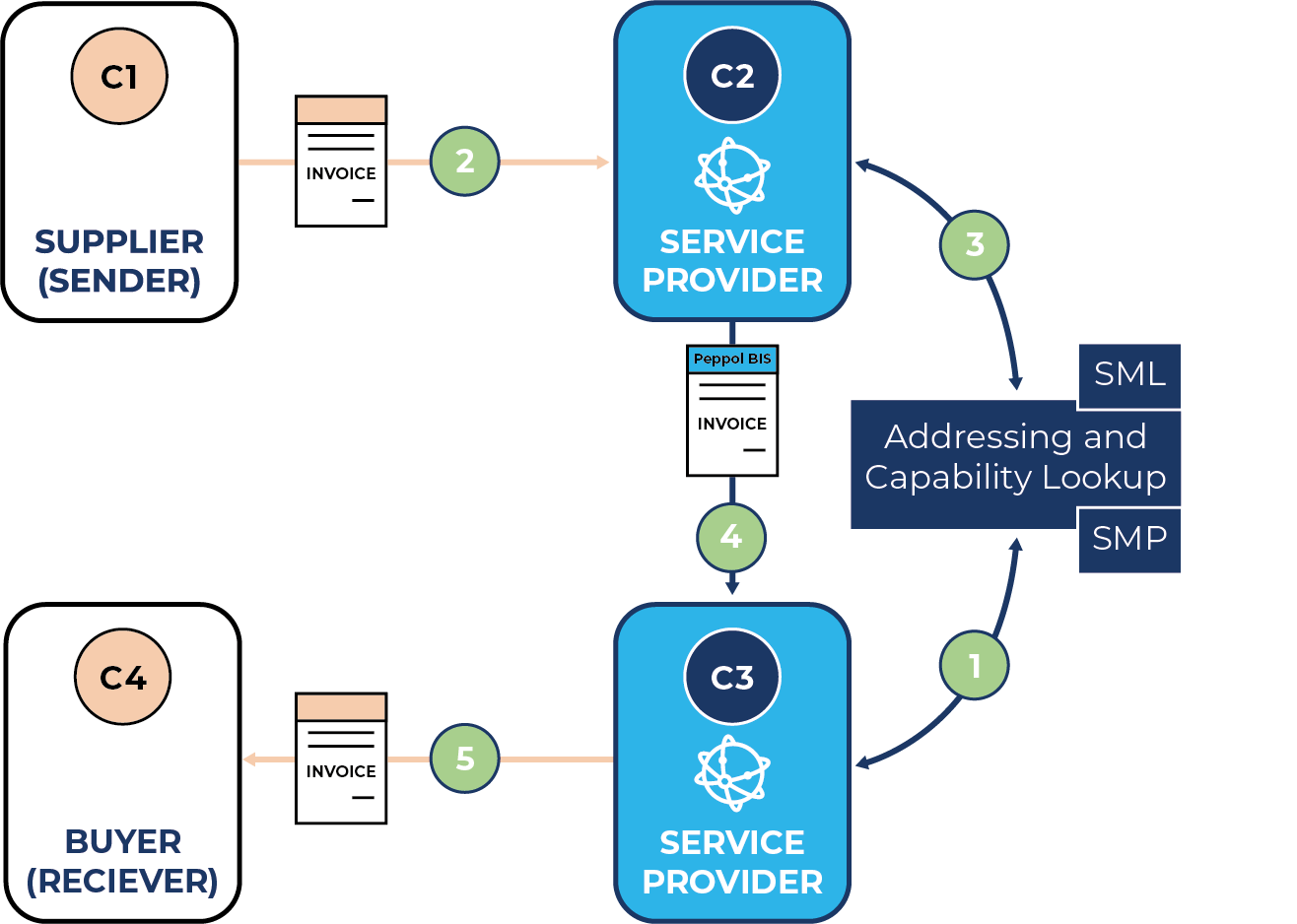 1. **Corner 1**: Your company (the sender)
2. **Corner 2**: Your Access Point (e-invoice.be)
3. **Corner 3**: The Access Point of the receiver
4. **Corner 4**: The company of the receiver
e-invoice.be does the Peppol transmission. Your system sends a document to the API, and the API converts it to UBL BIS Billing 3.0 and sends it to the Access Point of the receiver.
## Get started
Sign up at [app.e-invoice.be](https://app.e-invoice.be).
A sandbox company runs in test mode. Nothing goes to the Peppol network.
Call `GET /api/me/` with the API key of the sandbox company.
Send the invoice JSON to `POST /api/validate/json`.
Send the same JSON to `POST /api/documents/`.
Call `POST /api/documents/{document_id}/send`.
Do each step with complete requests and responses
## Core features
### Create e-invoices
Send invoices and credit notes through Peppol from a JSON payload:
```json Invoice theme={null}
{
"document_type": "INVOICE",
"invoice_id": "INV-2026-001",
"invoice_date": "2026-10-01",
"due_date": "2026-10-31",
"currency": "EUR",
"purchase_order": "PO-12345",
"vendor_name": "E-INVOICE BV",
"vendor_tax_id": "BE1018265814",
"vendor_address": "Brusselsesteenweg 119/A, 1980 Zemst, BE",
"vendor_email": "billing@e-invoice.be",
"customer_name": "OpenPeppol VZW",
"customer_tax_id": "BE0848934496",
"customer_address": "Robert Schumanplein 6 bus 5, 1040 Brussel, BE",
"items": [
{
"description": "Professional services",
"quantity": 10,
"unit": "C62",
"unit_price": 100.00,
"amount": 1000.00,
"tax_rate": "21.00"
}
],
"subtotal": 1000.00,
"total_tax": 210.00,
"invoice_total": 1210.00,
"amount_due": 1210.00,
"payment_term": "Payment within 30 days",
"payment_details": [
{
"iban": "BE68539007547034",
"swift": "GEBABEBB",
"payment_reference": "INV-2026-001"
}
]
}
```
Replace the vendor fields with the data of your company. The API rejects a document if the Peppol ID of the vendor is not one of the `peppol_ids` of your company.
Create and send an e-invoice
### Validate before you send
`POST /api/validate/json` examines the invoice JSON and does not create a document.
Validation is not a separate mandatory call. `POST /api/documents/` rejects a payload that does not pass the same rules. Use `POST /api/validate/json` while you develop, because it returns all rule failures and the generated UBL.
Validate invoices while you develop
### Look up Peppol participants
Make sure that a customer can receive e-invoices before you send. This endpoint does not require an API key.
```bash theme={null}
curl "https://api.e-invoice.be/api/validate/peppol-id?peppol_id=0208:0848934496"
```
```json theme={null}
{
"is_valid": true,
"dns_valid": true,
"business_card_valid": true,
"supported_document_types": [
"urn:oasis:names:specification:ubl:schema:xsd:Invoice-2::Invoice##urn:cen.eu:en16931:2017#compliant#urn:fdc:peppol.eu:2017:poacc:billing:3.0::2.1"
],
"business_card": {
"name": "OpenPeppol VZW",
"country_code": "BE",
"registration_date": null
}
}
```
Find and examine the Peppol IDs of your customers
### Receive documents
Documents that other Peppol participants send to your company go into the inbox.
Find received documents and download the UBL, the PDF and the attachments
### Webhooks
The API sends a notification to your server for each of these events:
* `document.received`
* `document.received.failed`
* `document.sent`
* `document.sent.failed`
Set up webhook notifications
## Developer tools
Overview of the host, the authentication, the endpoint groups, pagination and errors
Typed clients for TypeScript, Python, Ruby, PHP and Java
Validate, create and send documents from the command line
Status codes, error formats and retry rules
## For resellers
SaaS companies and software vendors can give Peppol e-invoicing to their customers.
Conditions and integration for SaaS platforms and service providers
## Support
Send an email to the support team
See the open-source projects
## Next Steps
Send a first invoice with a sandbox company
Test without traffic on the Peppol network
Change from a sandbox company to a production company
Changes to the API and to this documentation
This documentation is built and hosted on [Mintlify](https://mintlify.com), a developer documentation platform.
1. **Corner 1**: Your company (the sender)
2. **Corner 2**: Your Access Point (e-invoice.be)
3. **Corner 3**: The Access Point of the receiver
4. **Corner 4**: The company of the receiver
e-invoice.be does the Peppol transmission. Your system sends a document to the API, and the API converts it to UBL BIS Billing 3.0 and sends it to the Access Point of the receiver.
## Get started
Sign up at [app.e-invoice.be](https://app.e-invoice.be).
A sandbox company runs in test mode. Nothing goes to the Peppol network.
Call `GET /api/me/` with the API key of the sandbox company.
Send the invoice JSON to `POST /api/validate/json`.
Send the same JSON to `POST /api/documents/`.
Call `POST /api/documents/{document_id}/send`.
Do each step with complete requests and responses
## Core features
### Create e-invoices
Send invoices and credit notes through Peppol from a JSON payload:
```json Invoice theme={null}
{
"document_type": "INVOICE",
"invoice_id": "INV-2026-001",
"invoice_date": "2026-10-01",
"due_date": "2026-10-31",
"currency": "EUR",
"purchase_order": "PO-12345",
"vendor_name": "E-INVOICE BV",
"vendor_tax_id": "BE1018265814",
"vendor_address": "Brusselsesteenweg 119/A, 1980 Zemst, BE",
"vendor_email": "billing@e-invoice.be",
"customer_name": "OpenPeppol VZW",
"customer_tax_id": "BE0848934496",
"customer_address": "Robert Schumanplein 6 bus 5, 1040 Brussel, BE",
"items": [
{
"description": "Professional services",
"quantity": 10,
"unit": "C62",
"unit_price": 100.00,
"amount": 1000.00,
"tax_rate": "21.00"
}
],
"subtotal": 1000.00,
"total_tax": 210.00,
"invoice_total": 1210.00,
"amount_due": 1210.00,
"payment_term": "Payment within 30 days",
"payment_details": [
{
"iban": "BE68539007547034",
"swift": "GEBABEBB",
"payment_reference": "INV-2026-001"
}
]
}
```
Replace the vendor fields with the data of your company. The API rejects a document if the Peppol ID of the vendor is not one of the `peppol_ids` of your company.
Create and send an e-invoice
### Validate before you send
`POST /api/validate/json` examines the invoice JSON and does not create a document.
Validation is not a separate mandatory call. `POST /api/documents/` rejects a payload that does not pass the same rules. Use `POST /api/validate/json` while you develop, because it returns all rule failures and the generated UBL.
Validate invoices while you develop
### Look up Peppol participants
Make sure that a customer can receive e-invoices before you send. This endpoint does not require an API key.
```bash theme={null}
curl "https://api.e-invoice.be/api/validate/peppol-id?peppol_id=0208:0848934496"
```
```json theme={null}
{
"is_valid": true,
"dns_valid": true,
"business_card_valid": true,
"supported_document_types": [
"urn:oasis:names:specification:ubl:schema:xsd:Invoice-2::Invoice##urn:cen.eu:en16931:2017#compliant#urn:fdc:peppol.eu:2017:poacc:billing:3.0::2.1"
],
"business_card": {
"name": "OpenPeppol VZW",
"country_code": "BE",
"registration_date": null
}
}
```
Find and examine the Peppol IDs of your customers
### Receive documents
Documents that other Peppol participants send to your company go into the inbox.
Find received documents and download the UBL, the PDF and the attachments
### Webhooks
The API sends a notification to your server for each of these events:
* `document.received`
* `document.received.failed`
* `document.sent`
* `document.sent.failed`
Set up webhook notifications
## Developer tools
Overview of the host, the authentication, the endpoint groups, pagination and errors
Typed clients for TypeScript, Python, Ruby, PHP and Java
Validate, create and send documents from the command line
Status codes, error formats and retry rules
## For resellers
SaaS companies and software vendors can give Peppol e-invoicing to their customers.
Conditions and integration for SaaS platforms and service providers
## Support
Send an email to the support team
See the open-source projects
## Next Steps
Send a first invoice with a sandbox company
Test without traffic on the Peppol network
Change from a sandbox company to a production company
Changes to the API and to this documentation
This documentation is built and hosted on [Mintlify](https://mintlify.com), a developer documentation platform.